Integrate your CRM with your telephony system: work faster and provide a more personal experience


This is the third post in our blog series on Voys’ integration capabilities. In this series, we’ll show you how to make your business phone system work more seamlessly with the systems you use every day.
A customer calls. You answer. And even before you ask, “How can I help you?”, you already know who’s on the line.
No more searching through your CRM, jotting down notes on a piece of paper, or having a customer repeat their story. With a CRM integration combined with Voys’ telephony system, you can work faster, smarter, and in a more personalised way.
In previous blog posts, we explained how you can connect your phone system to other systems using call notifications and webhooks. Now we’re looking at a connection that many organisations will immediately recognise: CRM integration. In this blog post, you’ll learn how this connection between CRM and your telephony system works and what benefits it brings to your organisation.
How a CRM integration with telephony systems works
Do you already use a CRM system like HubSpot, Exact, RealWorks, or Medicom? If so, you know just how much customer information is stored there: from contact details and appointments to notes and pending tasks.
If your telephony system isn’t integrated with your CRM, you have to look up who’s calling during or after a call, take notes manually, or add a call summary afterward.
How convenient would it be if you could link your business telephony system to the wealth of information stored in your CRM system? With a CRM integration, you connect your phone system to your customer data. As soon as a customer calls, relevant customer information automatically appears on your screen, and the call is automatically logged. This way, you know immediately who you’re speaking with and can conduct the conversation in a more personalised and efficient manner.
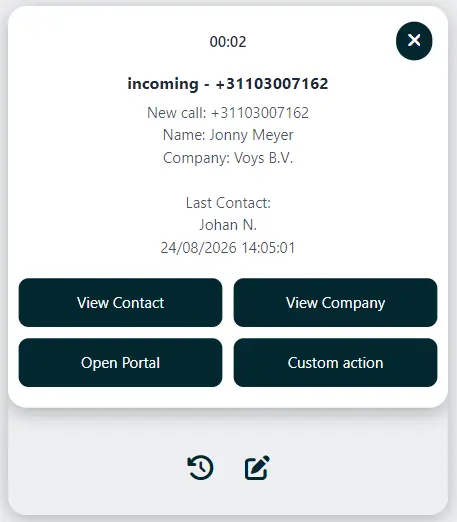
Pop-up with relevant information on your screen
If you use the CRM integration, a pop-up appears on your screen when you receive an incoming call. It displays, for example, the company name, contact person, phone number, or a note from the customer record.
That may seem like a minor improvement, but in practice, it saves a lot of time. You no longer have to search for the right customer profile and can start the conversation right away with the necessary context. This not only makes you feel more comfortable but also puts your customer at ease. They’ll notice that you’re prepared and won’t have to repeat information as often.
All customer information in one place
A good customer conversation doesn’t end the moment you hang up. Often, you’ll want to add a note, schedule a callback, or record the agreements that were made.
With a CRM integration with your phone system, you can keep all customer information in one central location. This allows colleagues to see what was discussed previously and makes it easier for them to take over a call.
This is especially helpful when a customer contacts you frequently and speaks with different colleagues. The colleague who answers the call immediately sees the available customer data and notes. That way, the customer doesn’t have to repeat the whole story. This instantly makes the customer experience much more pleasant.
Automatic call summaries in your CRM
Do you want to stop manually summarising what was discussed after a customer call? Then you can combine the CRM integration with your phone system using Voys Intelligence.
Voys Intelligence automatically transcribes calls and creates a brief summary of them. This includes the key points from the conversation, agreements made, and any follow-up actions. If you use Voys’ CRM integration, that call summary can be automatically imported into your CRM system.
This way, the context of the conversation is immediately associated with the right customer, without you or your colleagues having to manually retype that information. This is useful for various teams within the organisation, such as sales, support, planning, and customer service. Colleagues can immediately see what has been discussed previously, follow up more quickly, and avoid asking customers the same questions repeatedly. This helps you keep your customer file up to date and allows you to focus more on the conversation itself.
Call a phone number with a single click
A CRM integration with your phone system doesn’t just help with incoming calls, it also makes making outgoing calls easier.
With Voys’ Click&Call browser extension, you simply click on a phone number in your CRM, browser, or other program. Your phone, web phone, or app will then immediately dial that number. This helps you avoid typos, make outgoing calls faster, and work more efficiently using the systems you already use.
Less manual work, more focus on the customer
Many organisations unknowingly waste time on small tasks related to customer contact. Looking up a number, opening a customer file, making a note, updating a colleague, logging a call, and so on. Individually, these are small tasks. But added up, they take up a lot of time and attention.
By integrating your phone system and CRM, you can eliminate many of those manual steps from your workflow. Your team will have more time for what really matters: the conversation with the customer.
Is a CRM integration right for your organisation?
Is this a rhetorical question? Yes, actually it is. If you use a CRM system, we believe it makes perfect sense to integrate it with your phone system.
You’ll see the greatest benefits if:
- multiple colleagues are in contact with the same customers;
- you currently have to look up customer information manually;
- you want to better document your calls;
- customers are often transferred between agents;
- you want to respond faster and more personally;
- you want to work more efficiently;
- you want to automatically add call summaries to your CRM.
Which CRM systems does this work with?
Voys integrates with widely used CRM systems such as HubSpot, Salesforce, Teamleader, Simplicate, Zendesk, and Exact. Many other CRM systems can also be integrated.
Is your CRM not listed here? Then there’s a good chance there are still options available. Feel free to contact us to see if your CRM can also be integrated with Voys’ phone system.
Try the CRM integration for free for 30 days
Would you like to try out the CRM integration first? That’s no problem at all. You can try the CRM integration with Voys for free for 30 days (up to 5 users). After the trial period, you can easily convert the trial to a paid service and either upgrade or cancel it.
Want to learn more?
Curious to know if your CRM system can be integrated with Voys? Check out the options on our page about CRM integrations or contact us. We’d be happy to help you explore your options.
Want to learn more about other ways to integrate your phone system with your other systems? Be sure to read our blog posts about call notifications and webhooks.