Call notifications: get more insights from your business telephony


This is the second post in our blog series on Voys’ integration capabilities. In this series, we’ll show you how to make your business telephony work more intelligently with the systems you use every day.
Of course, I don’t need to explain that business telephony is a valuable source of information. Who’s calling? When are calls coming in? How long does a call last? Which colleague answered? And was the call perhaps forwarded? This essential information helps you set up your phone system as efficiently as possible, so you can assist your customers as effectively and fast as possible.
With the call notifications feature, you can link this call information to other systems you use in your business, such as your CRM, a dashboard, email, or Slack. This gives you greater insight into your customer interactions and helps you optimize your processes.
The better you understand what happens during phone calls, the easier it is to provide excellent service to your customers. In this blog, we’ll explain how to get the most out of call notifications.
What are call notifications?
Call notifications provide information about the status of a phone call. The Freedom telephony platform automatically sends data to another system as soon as something happens during a call.
For example, when:
- a call is initiated
- a phone rings
- a call is answered
- a call is transferred
- a call is ended
This way, you not only see that a call was made, but also exactly what happened during that call. That makes call notifications valuable for companies that want to improve their customer interactions, automate processes, or better manage their availability.
How do call notifications work?
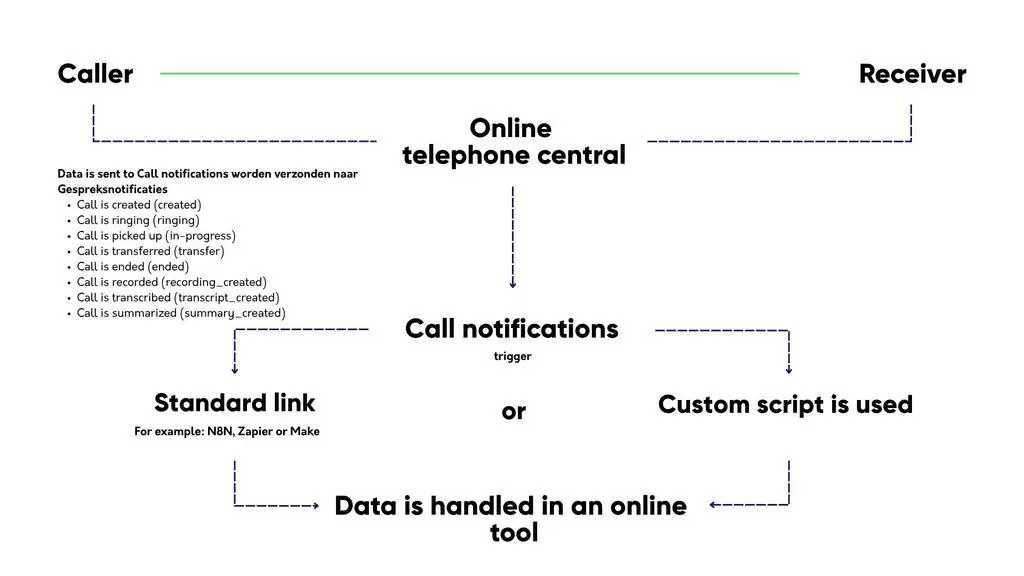
Call notifications work through a connection between Freedom and another online system. As soon as something happens with an incoming or outgoing call, a URL is automatically triggered. Behind that URL is your script, which determines what happens to the information.
That explanation may sound technical, but the result is primarily practical. For example, you can set it up so that information about a missed call is automatically sent to your CRM. Or so that you receive a notification in Slack as soon as a customer calls. Or so that call data is sent to a dashboard, allowing you to see exactly how accessible your team is.
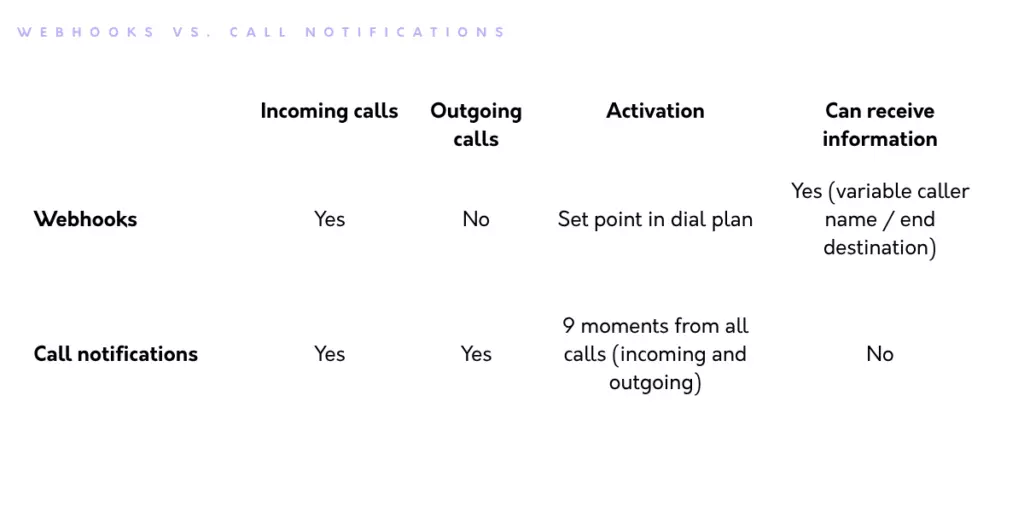
The great thing about call notifications is that they work not only for incoming calls, but also for outgoing and internal calls. Webhooks can only process incoming calls at a specific point in a dial plan. Because call notifications can also process outgoing calls, you get a much more complete picture of your phone system.
The most commonly used data that can be processed in a script looks like this:
- The call is initiated (created)
- The call is ringing (ringing)
- The call is answered (in-progress)
- The call is transferred after consultation (warm-transfer)
- The call is transferred immediately (cold-transfer)
- The call is ended (ended)
- The call is recorded (recording_created)
- The call is transcribed (transcript_created)
- The call is summarised (summary_created)
This diagram illustrates how the Call notifications integration works from a technical perspective.
There’s a lot more data that can be forwarded. Want to know what it is? Then take a look at our help page.
What happens during a call
Call notifications are especially useful because you don’t just see that a call came in, you can follow the entire flow of a call, from the first ring to the end.
For example, you can see which colleague answered the call. That might sound obvious, but it’s not always the person whose phone rang first. Did a colleague take over the call because you were already on another call? You’ll see that, too. You can also see which phones rang and which ones were unreachable.
A call transfer is also logged, including who transferred the call. You can’t get that information anywhere else. You can also see the difference between briefly consulting with a colleague before transferring the call and transferring the call immediately without waiting to see if someone picks up.
You can also see how a call ended, with six different possibilities. For example, someone might hang up before the call is answered, or give up while in a queue. And that’s different from a phone line that was busy. Most companies lump all of this together under “missed calls,” and as a result, they miss exactly where things are going wrong.
The difference between call notifications and webhooks
Call notifications are similar to webhooks, but they are not the same.
Webhooks allow you to retrieve or pass on information once during an incoming call. This is useful if, for example, you want to identify a caller or trigger a smart action based on the caller’s phone number. For instance, you can give the caller the option to enter a code. Or you can make the call plan dynamic by routing callers to specific colleagues or departments without having to use a menu. Sounds interesting? Read all about webhooks here.
Call notifications provide information about various call statuses. And unlike webhooks, this integration also transmits statuses during the call itself. Think of call transfers, which colleague answered the call, and which phones rang. You can also trigger external smart actions based on this information. The main difference from webhooks is that call notifications cannot influence a dial plan, they handle both outbound and internal calls, and they contain more information.
This overview summarises the differences between call notifications and webhooks:
What can you do with call notifications?
Call notifications let you integrate your business phone system with all kinds of tools you use every day. This allows you to automate manual tasks, improve your customer interactions, and gain better control over your availability.
Below, we’ll share a few options that are commonly used by our customers.
Connecting call notifications to Your CRM
One of the most common uses is integrating with a CRM system.
Imagine: a customer calls your company. Thanks to call notifications, you can automatically log that contact. For example, you can see when the customer called, how long the call lasted, and which colleague spoke with the customer.
This is incredibly useful for your sales or support team. Colleagues no longer have to search through different systems or update each other. The information is simply available right where they’re already working. Even smarter: with Voys Intelligence, a summary of each call automatically appears in the customer profile.
Please note: if you want to set up the integration with call notifications, it will take quite a bit of development time to link the insights from the call notifications to your CRM. Don’t have the time or expertise to build such a connection yourself? Then choose the easiest solution: Voys’ standard CRM integration.
Automatically record call transcripts in your CRM
In addition to the status of a call, you can also have its content automatically recorded. The transcribed text of the call is then included in the call notification, neatly broken down by each speaker. This allows you to automatically save a call transcript in your CRM, or use AI to instantly turn it into an action item. Was the call transferred? You’ll receive a transcript for each part of the call, so you can see exactly what was said before and after the transfer.
This makes taking manual notes a thing of the past. It prevents a customer from having to repeat the same story three times, and that’s exactly the kind of customer interaction that makes people happy.
Good to know: You’ll need the Voys Intelligence add-on for this.
Using call notifications for dashboards
Do you want more insight into your phone availability? If so, you can link call notifications to a dashboard tool. Tip: first, determine what you want to achieve with your dashboard, then create a usable dataset from the call notifications and link it to your dashboard.
In your dashboard, you’ll then see, for example:
- how many calls are coming in
- how many calls are missed
- what the average call duration is
- which colleagues answer a lot of calls
- how many outbound calls are made
- when it’s busy
- how often calls are transferred, and by whom
This is valuable information for customer contact teams, support departments, and sales organisations. You might find that certain calls are transferred with unusual frequency, or that customers often call at times when there aren’t enough colleagues available. With these insights, you can optimise your telephony system and improve your customer service.
Receive an email when you miss a call
You can also use call notifications to automatically send an email when you miss a call.
In such an email, you can include, for example:
- who called
- when the call came in
- which number was called
- what follow-up action is needed
This way, a missed call won’t just be forgotten. You can incorporate the message into your workflow, for example, by automatically turning it into a callback request.
Would you also like to receive a notification for voicemail messages? You can set that up separately via the Voicemail module. If you enable voicemail transcription, you’ll also receive a clean transcript of the voicemail message in your inbox.
Connect call notifications to Slack or Teams
Do you use Slack, Microsoft Teams, or another internal communication tool frequently? If so, you can use call notifications to automatically send alerts to a channel, for example, for missed calls, important customer calls, or calls received outside of business hours.
Such a channel can be useful for:
- support teams
- sales departments
- service desks
- on-call services
- small teams where everyone handles customer contact
It’s a good idea to create a separate channel for this. That way, notifications stay organised and don’t get lost among all the other messages from the organisation. Everyone can immediately see what’s happening and who needs to take action.
Call notifications and automation
Perhaps the best thing about call notifications is that they help you avoid manual work.
You no longer have to make a note yourself that someone called, keep separate lists of missed calls, or constantly retype information from your phone system into another system.
That saves a lot of time, but more importantly, it reduces the risk of errors. After all, the less manual work there is, the less likely it is that a callback request will be overlooked or that call information will be lost.
No technical knowledge? Use a workflow automation platform like N8N
Some integrations require technical knowledge, for example, if you want to create your own script that processes call information and forwards it to another system.
But that doesn’t mean call notifications are only useful for companies with their own development team. Many systems offer standard integration capabilities, and with tools like N8N or Zapier, you can build smart automations without much programming knowledge. This allows you to connect your phone system to your CRM, project management tool, email inbox, or chat application, for example.
This way, you can make your phone system a lot smarter without having to dive deep into the technical details right away.
When are call notifications useful for your business?
Call notifications are especially useful if you want to do more with the information from your phone calls.
For example, if you:
- have a lot of customer contact over the phone
- want to follow up on missed calls more effectively
- want to automatically save call information in your CRM
- want insight into availability and call volume
- want to streamline your sales or support process
- want to reduce manual work
- want to make customer contact more personalised
For small teams, it can be helpful just to follow up on missed calls more effectively. For larger organisations, it helps make customer interactions measurable and scalable. For any business that interacts with customers, the same rule applies: when customers call, you want to ensure that follow-up is handled properly.
Smarter customer engagement starts with insight
With call notifications, you can get more out of your business phone system. You gain insight into what’s happening with calls and link that information to the systems you already use.
This makes your work easier, your processes smarter, and your customer interactions better. Customers don’t want to be passed from one person to another; they want to be helped by someone who knows who they are, why they’re calling, and what was discussed previously. Call notifications help you achieve exactly that.
Want to get more out of your business telephony?
Want to know how to integrate your phone system more intelligently with your CRM, dashboard, or other tools? Check out Voys’ integration options or contact us. We’d be happy to work with you to design a solution that fits your business.