Webhooks: connect your business telephony to almost anything


This is the first post in our blog series on Voys’ integration capabilities. In this series, we’ll show you how to make your business telephony work more intelligently with the systems you use every day.
We’re kicking things off with webhooks: a technical but incredibly powerful way to connect your phone system to other tools, databases, and processes.
Transferring calls, setting up a menu, and recording a message: these are the basic features of business telephony. Many organisations have set up one or more of these features in their dial plan. Handy, of course. But you can do much more with your phone system by using webhooks.
With webhooks, you can basically build anything you want. From opening a gate when someone calls a phone number, to automatically displaying customer information on your device, webphone, or app, and from smart routing based on an order number to tracking phone conversions.
Sound technical? It is, to some extent. But the possibilities are very practical. In this blog, we’ll teach you all about it.
What is a webhook?
A webhook lets you connect various systems to Freedom, Voys’ telephony platform, using a URL. It’s a way to have systems automatically exchange information with each other. For example, you can set it up so that when an incoming call comes in, the caller’s name is looked up in your CRM system or another database. Is the phone number in your CRM? Then the integration returns the caller’s name to Freedom. That name then appears on the display of your VoIP phone. That way, you know right away who’s calling.
Does a CRM integration with phone systems sound interesting, but you don’t have the technical expertise to build this integration yourself? No problem: with our standard CRM integration, you can set up the integration without any technical know-how. You can read more about our standard CRM integration with Voys’ business telephony in this blog.
In addition to CRM integration, there are plenty of other possibilities, more on that later. Let’s first take a look at exactly how a webhook works.
How does a webhook work in business telephony?
A webhook automatically sends real-time data from one application to another as soon as an event occurs, without requiring you to check for it manually. In addition, there are extra features you can use: parameters. These are the data points that enable communication between our telephony platform and the product you want to integrate with. At Voys, there are four different parameters you can include in your webhook script:
An entered code (code)
The called number (did)
The caller’s number (caller-id)
The caller’s name (callername)
When a URL is called, the associated script will execute. The database is searched for a match with the parameter, for example, the dialed number. The search results are then sent back to the telephony platform. The following scenarios are possible:
- Input successful (ACK)
- Input failed (NACK)
- Something went wrong with the input (ERR)
Based on this status, a decision is automatically made on how to proceed with the process. You configure this in the Dial plan:
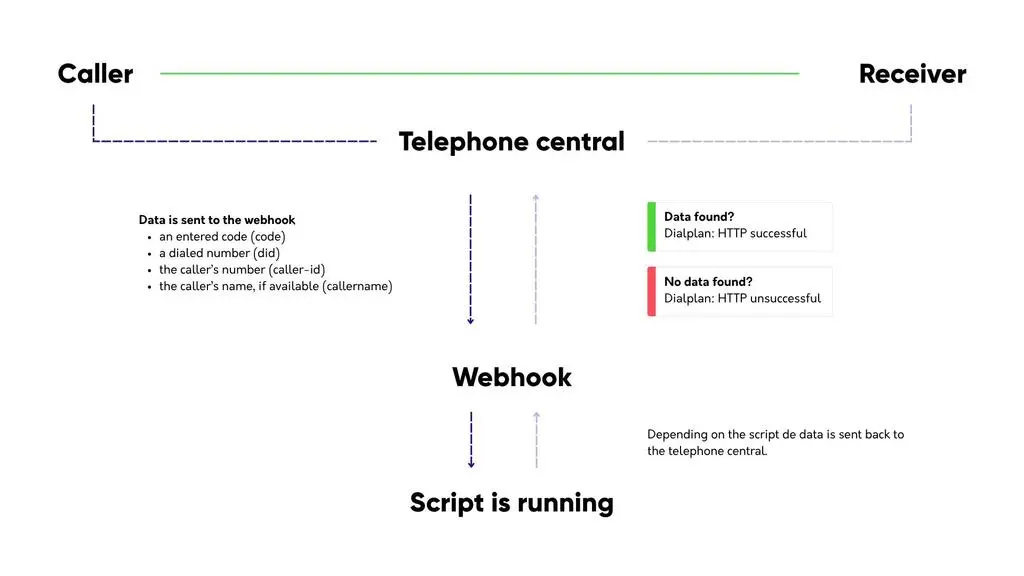
You can then use the returned results to do all sorts of things. For example, you can display which customer is calling, open barriers, or track calls in Google Analytics.
Pro tip: You can find examples of scripts and further explanations about how webhooks work on our help page.
The difference between webhooks and call notifications
In addition to webhooks, we also provide call notifications. They’re similar, but not the same.
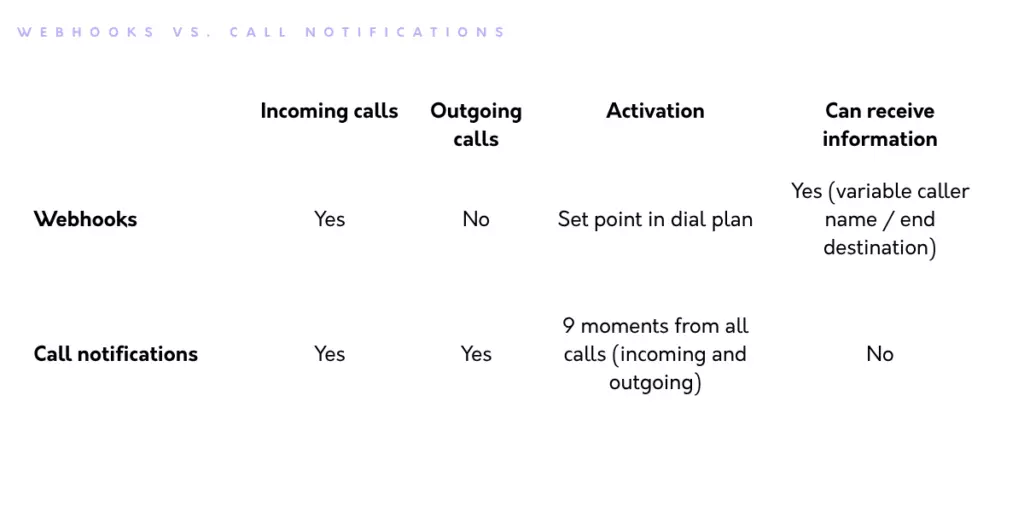
With webhooks, you can retrieve or pass on information once during an incoming call. This is useful if, for example, you want to identify a caller or trigger a smart action based on the calling phone number. For instance, you can give the caller the option to enter a code. Or you can make the call routing dynamic by forwarding callers to specific colleagues or departments.
Call notifications pertain to various call statuses. And unlike webhooks, this integration also transmits statuses during the call itself. Examples include call transfers, which colleague answered the call, and which phones rang. You can also trigger external smart actions based on these notifications. The main difference from webhooks is that call notifications cannot influence the call plan, they handle both outbound and internal calls, and they contain more information.
This overview summarises the differences between call notifications and webhooks:
What can you do with webhooks?
That covers the technical side. Of course, what’s more interesting is how you can use them in your business telephony. As mentioned earlier, you can see who’s calling by integrating with your CRM. But there’s more you can do. Much more, in fact. The only limit is your own creativity. To help you get started, we’ve listed a few examples for you.
Order number or customer number on the display
You can use webhooks to have callers enter a code, such as an order number, customer number, service request number, or appointment code. You can then display this code on your phone.
Here’s how it works:
1. The customer calls your business.
2. The customer enters an order number or customer number.
3. Freedom sends this code to your database via the webhook.
4. The script checks whether the code is recognised.
5. Is there a match? If so, the script sends information back to Freedom.
6. The order number or customer name appears on the phone’s display.
This allows your colleague to immediately retrieve the correct order or customer details.
You can expand this functionality even further. Since your script knows the order number, you can use a push tool to display a pop-up on your colleague’s computer. When your colleague clicks on that pop-up, the correct order or customer record opens immediately. That saves a lot of searching!
Automatically route calls to the right colleague
Webhooks are also ideal for smart call routing. Suppose an existing customer calls your general number. You’d rather not have this customer go through an automated menu first. With a webhook, you can check which customer is calling and which account manager, support representative, or department is assigned to them. You can then automatically route the call to the right person or team.
This is great for your customer, because they’ll be connected to the right colleague faster. And it’s great for your colleagues, because you avoid unnecessary transfers or waiting in a queue.
With Voys Reach, you can also easily set it up so that customers are connected to the right team member, with the added benefit that you don’t need any technical knowledge to do so.
Entering an SLA code Outside Business Hours
Some companies use Service Level Agreements (SLAs). For example, for customers who are entitled to support even on weekends or outside business hours. With webhooks, you can set up such a process efficiently.
Example: A customer calls on the weekend. You want to make sure this customer is entitled to weekend service. In that case, you can ask the caller to enter an SLA code. If a valid code is entered, you can transfer the caller to the on-call technician. If the code is invalid, you can send the caller to voicemail or play a notification message.
You can even expand this based on the day of the week. On Saturdays, you can route calls to colleague A; on Sundays, to colleague B; and on holidays, to a separate on-call service. This makes your organisation’s availability outside of business hours much more efficient.
Opening a door, gate, or barrier
Webhooks aren’t just useful for customer contact. You can also use them to control physical systems, such as a door, gate, or barrier.
A visitor calls a special phone number or enters a code. The webhook verifies whether the code is correct. If it is, the door, gate, or barrier opens automatically. This is useful for businesses with a parking lot, warehouse, industrial park, or office without a permanent reception desk.
You can even get more creative. Want to turn a light on or off with a phone call? Technically, it’s possible. With a platform like Arduino, a web server, and a relay, you can use a webhook to control a physical device.
Tracking Statistics with Webhooks
To measure is to know. Effective business management requires data and statistics, and webhooks can help with this as well.
Of course, you can also extract information from your call log. But with webhooks, you can track metrics in a bit more detail. For example:
- which number is called most often
- how many calls come in to a specific campaign number
- at what times the most calls come in
- how many calls go through a specific route (such as a voice menu)
With a script and a database, you can store incoming calls and analyse them later. This essentially allows you to build your own analytics module. This is useful if you want specific insights that aren’t available by default in your telephony system.
Do you need technical knowledge to use webhooks?
Yes, usually. Webhooks are powerful, but they often require technical setup. You’ll need a webhook URL, a script that processes the correct information, and a system that can send data back to Freedom.
Do you have an in-house developer or an IT partner? If so, they can often help you build this kind of integration. Don’t have that luxury? You might still be able to get a long way by using AI.
Even without technical knowledge, there are other options available. Consider existing CRM integrations, connections via integration platforms like N8N, Zapier, and Make.com, or standard features within your telephony system.
The most important thing is to first clarify exactly what you want to achieve. Then you can determine whether webhooks are the best solution for your goal.
When are webhooks useful for your business?
Webhooks are especially useful if you want to integrate your phone system with specific processes in your organisation.
For example, if you:
- want customers to enter a code
- want to open a door, gate, or barrier via your phone system
- want to optimise your call routing plan using information from other systems
- want to implement different routing based on incoming information, such as a phone number
You usually don’t need webhooks for simple phone-related tasks. But if you want customisation, automation, or smart routing, webhooks become very useful.
Want to get more out of your business telephony?
This is the first blog post in a series about integration options with Voys’ telephony system. In the next blog post, we’ll tell you more about the call notifications feature.